



WCU Course Registration Manual
A. Using Laptop/ Desktop Computers
Course registration is not possible on the Cell phone classe365 App, so it must be used on Laptop or Desktop.
· Go to https://wcusandiego.classe365.com/
· Click Sign in as Student on the right side of the screen.
· Enter the ID (Your email) and password you received from the school.
· If you do not know your ID or password, contact sdinfo@wcuniversity.edu or call 858-768-0011
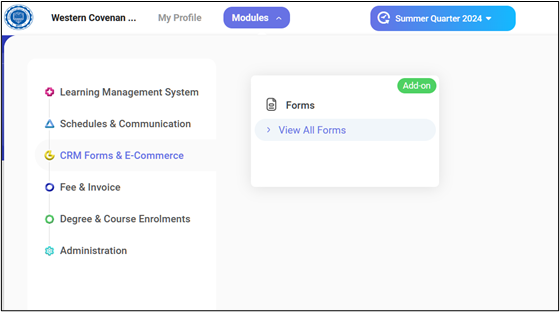
· Click the [Modules]—>[CRM Forms & E-Commerce]—>[View All Forms]
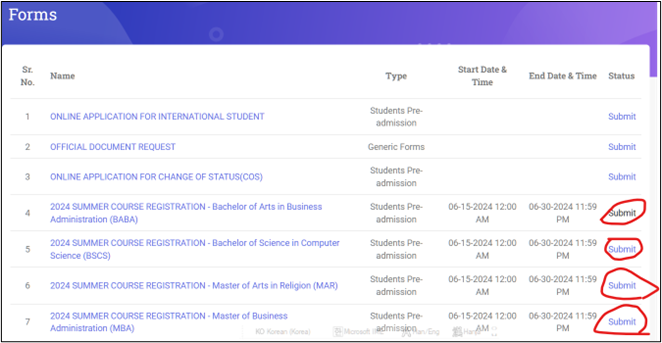
· Select the Course Registration file corresponding to the student’s major and click the [Submit] button.
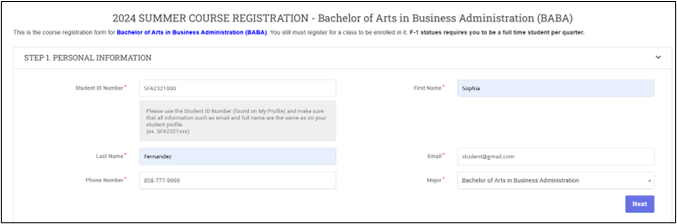
· Input Student information.
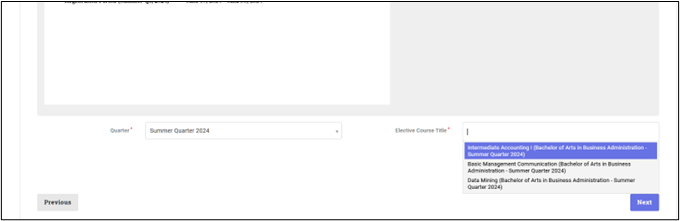
· Select Quarter and take course title. Bachelor student take minimum 3 courses.
Master student take minimum 2 courses.